
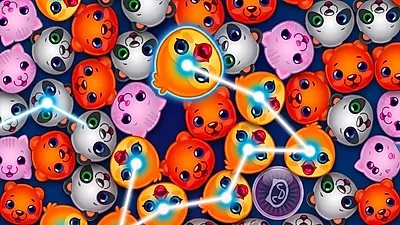
How to play?
Game Rules:
- Rule 1: Your primary mission in Fluffy Cuddlies is to rescue the charming baby animals trapped within the machine. You accomplish this by drawing lines to connect three or more identical cuddlies.
- Rule 2: Maximize your score by forging the longest possible chains. Connections can be made in any direction—horizontally, vertically, or diagonally—allowing for complex and rewarding matches.
- Rule 3: Always prioritize the level objective. Many stages require you to rescue a specific quota of a particular animal type, so focus your matching efforts accordingly to progress.
- Rule 4: Don't despair if the board seems devoid of viable moves. Utilize the cluster shake feature to scramble the animals, potentially revealing new matching opportunities and breaking the stalemate.
- Rule 5: Be mindful of the constraints imposed by each level. Whether it's a strict time limit or a restricted number of moves, careful planning and efficient matching are crucial for success.
- Rule 6: Anticipate the cascade. When animals are removed, others will fall into their place. Try to visualize these shifts to set up massive chain reactions and clear the board more effectively.
Controls:
- Action: Navigate the board by moving your mouse cursor over the grid.
- Action: Initiate a chain by left-clicking and holding on the first animal.
- Action: Drag the cursor through adjacent identical animals to form a connecting line.
- Action: Release the left mouse button to finalize the match and set the animals free.
FAQ:
- Q: Are diagonal matches permitted?
- Q: What is the consequence of failing a level objective?
- Q: How do I activate the board shake?
Absolutely. You are encouraged to connect animals horizontally, vertically, and diagonally. Exploiting diagonal links is key to creating extensive chains and securing higher scores.
Should you deplete your moves or run out of time before meeting the objective, you will be required to restart the level. Analyze your previous attempts and refine your strategy to overcome the challenge.
Locate the dedicated "Shake" button on the user interface. Clicking this will rearrange the animals, offering a fresh perspective and potentially creating new, advantageous groupings.


Comments
Be the first to comment!